Nature Tips #3 Shooting The Sun

Someone asked me last time for tips on shooting the sun, so random guy out there, here you go.

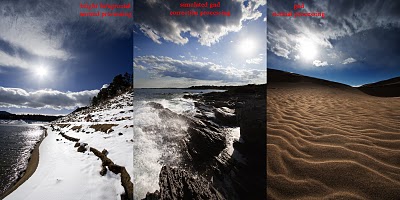
When you put the sun the image the trick is to get light between it and the rest of image balanced.  You can balance the light with a filter or some work in photoshop.  A graduated neutral density filter (referred to as a gnd from now on) fits this role just fine.  It still has all of the normal problems of flare and unwanted vignetting that can come with using filters, but it still does the best job.  If you do not have one, simply cannot get the shot without a prohibitive amount of flare, or the scene has too jagged of a horizon for a gnd, you can come back and fix it up in photoshop.

When you fix it up in shop, you can either simulate the effect of a gnd filter, exposure blend, or shoot HDR (which has its own problems).  There are limits to what you can do with a single exposure in terms of 'fixing it.'  First is that when you brighten, noise becomes apparent in the image but to expose the sky correctly you need to underexpose the ground.  Make sure you have histogram on in your display and highlight warning.  Take a test shot and then compensate (it's hard to meter well for this at first, so enjoy the advantages of digital as you learn to gauge it).  You are aiming for a shot that has the sun true white and reasonably small while retaining cloud detail.  The highlight warning will show you when you start clipping the highlights in the clouds, showing that you have taken in as much as you can get away.  When correcting like this, you have to pick and choose the foreground.  Silhouetted or shadow heavy foregrounds, like a forest, the dark side of mountain, etc do not work well, there is just too much correction and subsequent noise.  Well lit sand, brush, flat areas, and particularly snow work the best.  With snow, there often is hardly any correction at all.

Once you have the image in the raw importer, you should notice a little icon shaped like a filter and filter holder on the top menu bar, that is the gnd simulator.  Like with everything that has to do with exposure correction, if you can do it in the raw import, do it there.  The gnd tool allows you to draw the transition line creating a primitive gradient mask in the importer.  While the masking leaves something to be desire, you get a solid set of tools to edit with that draw on data from raw file allowing for less damaging changes to the image.  Once you have corrected the image import it and edit as normal.  Masking based on percent gray is the best way move on from here.  Tony Kuyper has a good tutorial on creating and using such masks over

here

.  For this image, I made brighter than 50% mask and brought down those tones in the sky while retaining the top ones with a curve.  Then a similar move with the shadows.  Next I added contrast to the moving water with a brighter than 50% mask lowering the mid-tones while brightening the highlights.  Finally I adjust the cyan to true blue in the sky and removed the yellow in the sky along the horizon.

Now suppose you were smart enough to bracket your shots and you have multiple exposures to work with you can blend exposures or do HDR now.  Pick two exposures, one for the sky and one for the foreground and open them in Adobe Camera Raw.  In ACR process the exposures with only the relevant area in mind.  Once you are satisfied, adjust for the color on which ever has the most information.  Then, in the upper left, select both images and click "synchronize."  In that menu select white balance to make the two match in color.  Leave checked anything else you want synced between the two images (like cropping or leveling the horizon).  With both selected, click open images.
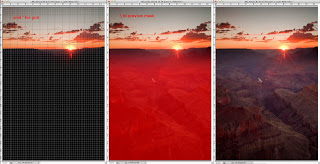
After opening the images select all of one of the images (for the example I selected the one set for the sky) and then copy paste it into the other file.  With the top layer (sky in the example) selected click on the layer mask button.  Into the mask were going to make a gradient, to make sure it is level you will want to turn on your grid lines (hot key cmd ' on mac).  The gradient tool will auto snap to these lines.  Usually to get a gradual enough change you will want the gradient to cover up a fair portion of both the ground and sky.  What will look best will be different for each image.  In the example image you can see the placement of my mask in red.  On the right is the final blend, from here you can continue to edit as normal.

Next:
How to vignette not like an idiot hipster

El Dorado Canyon

El Dorado Canyon is a nice but popular State Park located just inside the front range between Denver and Boulder.  Nearby is the southern half of Boulder Mountain State Park and Flat Irons Vista both of which can make heading over to the area worth your time.  By being so close to Denver and Boulder near H-36 it is an excellent evening hike if you are in the mood for less driving (from Denver) and a laid back walk.  There are three trails in the park, one that goes up to the foundations of an old hotel and for an overlook of the continental divide (plagued by trees, but what view isn't?), one that runs by the north side of the stream, and a third that provides access to the western side of the park leading near the Walker Ranch and even further west Gross Reservoir area.  The western part of the park actually caught on fire back in '09 as explained in a

previous entry

.

The park consists of a impressively sheer faces leading down into a rather charming steam that cascades occasionally through out the eastern half of the park.  In the summer the place becomes a solid green sprinkled with purple flowers while in the winter the whole of the park enjoys the edge of mountain snows.  The snow in the winter can become quite deep and it does get the mountain blizzards that can make driving sketchy, but every time I have gone out in such weather I was only chap in the park besides the rangers.  More for than just the solitude, the park really shines photographically at this time as it hides much of the human impact, covers the problems with the sky, and can make for simply gorgeous textures on the mountain faces that will not last the first direct sunlight on them.  During the winter excellent ice forms throughout the stream and over in areas at times.  I would never test this ice to walking over it though.  Along the sides where there is less flow you might be able to get away with it but the stream remains active all year making center ice always questionable.  In the spring, particularly during storms the flow becomes impressive.

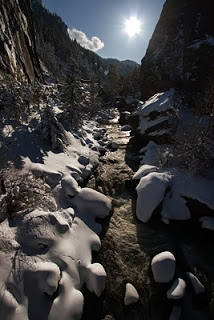
Photographically I have always found the park to be frustrating under normal weather.  Effective evening and morning light is difficult.  The stream bends back and forth so much that light becomes blocked quickly often leaving one side of the stream completely unlit (see the first photo).  Further I have never had good luck with clouds here either.  I don't know what it is about the spot, but it is almost always all or nothing useful. For those reasons, I prefer the park during winter storms for photography.

As one would imagine, the park can become very busy or even full on summer weekends while at all times during the week it is common to find at least one face obscured by climbers practicing on its convenient faces.  During winter all of that disappears, usually a handful of hikers will be out on the forested part of the trails leaving the stream and mountains free of distractions for photographing.

More photos of the area, refer to my:

flickr

Hanging Lake

Hanging Lake an incredible spot along I-70 south of Glenwood Springs that is perfect for an afternoon photo shoot. The whole of the experience is enjoyable and fits that rare category of being just the right amount of effort to be physically satisfying but not exhausting. The trail starts next to a stream and it is uphill continuously from there for 1.25 miles. Around you are tall trees in a deep narrow canyon, accompanying you for the duration is the stream that is fed by Hanging Lake and Spouting rock.

Once, with another photographer, I hit the trail an hour before sunrise just after a rather nasty little snow storm. To our somewhat sheepish horror, along the trail going in the same direction as us for about 1/2 mile were mountain lion tracks. We could see in the tracks where it came right up the stream at one point, presumably to get a drink.

While in the summer the trail is relatively easy footing that becomes rather less true in the winter. The trail becomes a well-worn rut in the deep snow that people smooth to a perfectly terrible sheen by sledding down in parts, making it rather maddening if you don’t have metal spikes on your shoes. The last little bit that curves around a tree sprouting up out of the rock, where they have rough steps and placed a crude and seemingly not quite substantial enough banister, can also be rather nervous in the winter if it has just snowed. The whole thing can turn into a nasty slick. Bring some snow-shoes with spikes for grip if you make a winter go!

Once you have made it up, you get a fantastic view of the canyon. The canyon faces south-east making morning light better than evening for photographing the lake, but even then the lighting is not fantastic. The lake itself is just past the view point and is rather unfortunately bridged by a wooden walkway to allow access to both sides of the shore. From the far side you can gain access to a rather tempting-looking downed tree that has a flat side facing up. I would avoid this unless you are truly the surest of foot. The water all times of year will be in the least brisk and that rather stable-looking tree is deceiving you. The further out you go on it the more you will find it is actually swaying back and forth from the flow of the falls making balance difficult.

Rather than falling into the lake at the wrong time of year and having a right bad time of it, make your way up to Spouting Rock behind the lake and further up the trail. You can go up from either side of Hanging Lake really, but the left is usually easier depending on the snow. In the summer either is fine. Up there you will find a stream that leads up to a small pool being fed by yet another waterfall. If you make your way behind these falls you will notice that below them out of the rock face is another much smaller water-fall that jets water. This formation can really shine in the winter when the upper part of the falls is frozen and just Spouting Rock is flowing.

There are no fees for the park and its proximity to I-70 makes it a popular spot to go. In my experience on early mornings you can enjoy the place by yourself until normal day hikers come and ruckus up the place.

For more photos of the area, refer to:

my flickr